Running the Phone Client via Termux
🎉 The mobile client has been officially released!
Non-advanced developers do not need to read this document; please use the released client directly.
📱 Client download link: docs/player/new-phone-client
⚠️ The following content is for reference by advanced developers only.
Video Tutorials
Bilibili: https://www.bilibili.com/video/BV1ZicuzkETc/ YouTube: https://youtu.be/362cUVcYms8
Usage Procedure
- Download Termux. Download link: https://update.ezsapi.top/termux.apk
- Install Termux and set its power management to Unrestricted, Lock in Background to prevent it from being killed in the background.
- Open Termux.
For first-time runs, execute the following command: copy and paste it into Termux, then press Enter.
curl -fsSL https://firmware.undersilicon.cn/control-panel/run_control_panel_stable.sh | sh
If it is not the first run, execute the following command to improve loading speed (if you want to update, still use the command above).
cd "${HOME}/control-panel-stable" && npm run dev:all
Wait for the process to complete, similar to the image below (if there is no similar image after 20 minutes, please refer to FAQ 1).
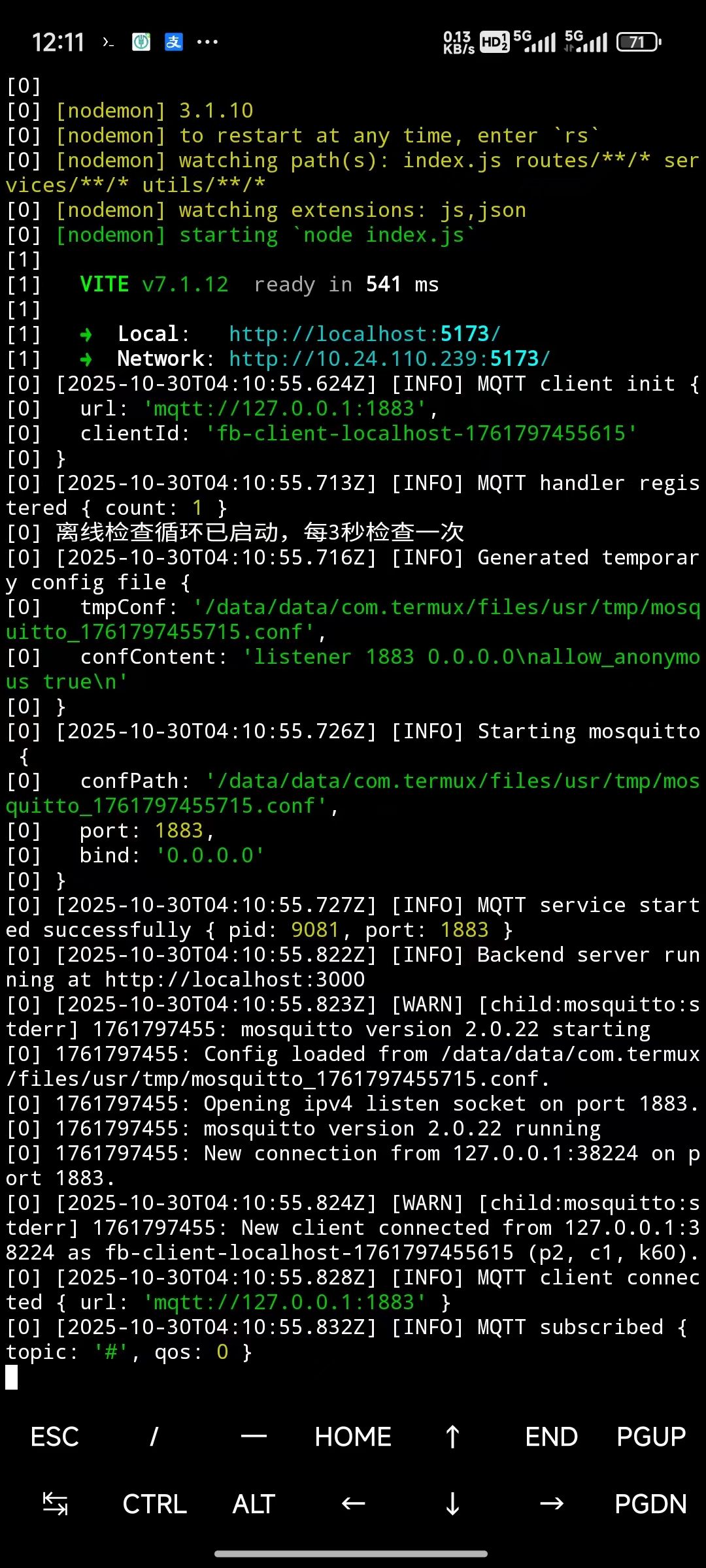
- Turn on your phone's mobile hotspot. It is recommended to set the hotspot name to
easysmart, password to eight 1s (11111111), and frequency to 2.4GHz. The device will automatically connect. (If not using these settings, please refer to other documentation for device network configuration methods. Using the default settings is recommended.) - Open your phone's browser and visit
127.0.0.1:5173. - At this point, you should see your device connected under Device Management, and you can start games from the Game List (if empty, try refreshing).
Frequently Asked Questions
Did Not Start Normally
Due to network issues, there is a certain probability of startup failure. There are three solutions:
- Reinstall Termux (or clear all Termux data), then run it again.
- Restart your phone, reinstall Termux (or clear all Termux data), then run again.
- If the download speed is too slow, try downloading outside the period from 7 PM to 12 AM, as the network is usually congested during this time. Mornings are generally smoother.
Also, check if Termux is set to Unrestricted Background.
If the above methods still do not resolve the issue, please join QQ group 970326066 and contact the group owner for assistance.
Device Cannot Connect to Phone Hotspot
Switch your phone hotspot to 2.4GHz. If it still doesn't work, try connecting other devices to the same phone hotspot. Possible Cause 1: Other phones also fail to connect to the hotspot, indicating an issue with the phone hotspot.
Possible Cause 2: Phone hotspot issue. Some phones cannot set a 2.4GHz hotspot while connected to a 5GHz Wi-Fi. In this case, disconnect your phone from Wi-Fi and use mobile data only, then enable the Wi-Fi hotspot.
Possible Cause 3: The user performed network configuration, and the device no longer connects to the default Wi-Fi. Please use the configuration app to reconfigure the device to the default Wi-Fi name and password. The Wi-Fi name in the app can be modified.
Termux Displays "Unable to install bootstrap"
Do not install Termux in phone分身 (parallel space), dual-app mode, or similar environments.
Cannot Access 127.0.0.1:5173 via Phone Browser
Set Termux's power management to Unrestricted and Lock in Background to prevent it from being killed in the background.